Windows Explorer extension that adds the entry "Assembly Information" to the context menu of .NET assemblies:

Displays .NET Assembly information like:
- Compilation mode (Debug/Release)
- .NET Assembly full name
- Framework version and PE kind
- .NET Assembly references (even recursively)
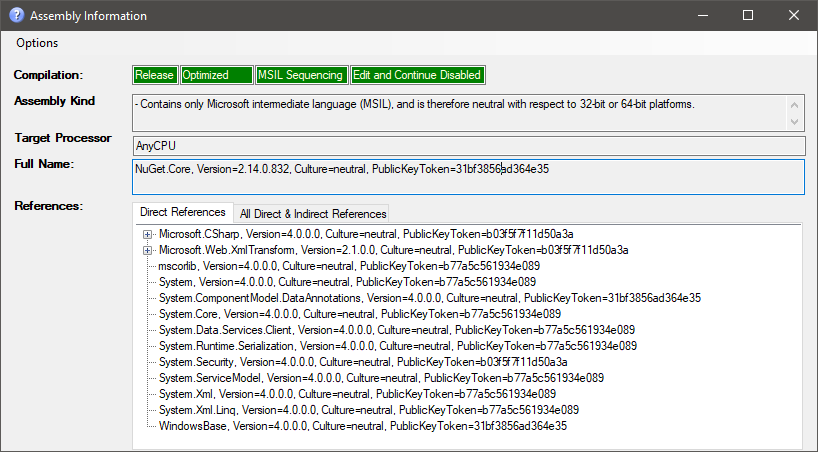
Works with assemblies from all .NET versions: .NET Framework, .NET Core, .NET 5+, and .NET Standard. Also shows Win32 version info for native PE files.
Supports dark mode (configurable via View > Theme menu).
Download the latest release from GitHub Releases and run install.cmd as Administrator. This registers the Explorer context menu for .dll and .exe files.
Requires .NET 10 Desktop Runtime or newer.
To uninstall, run uninstall.cmd as Administrator.
Requires .NET 10 SDK.
dotnet build AssemblyInformation.sln -c ReleaseAssemblyInformation.exe <path-to-assembly.dll>Or right-click a .dll/.exe in Windows Explorer and select "Assembly Information" (requires installation, see above).
You can also drag and drop files onto the application window, or use Options > Open Assembly (Ctrl+O).
.NET Assembly Information source code is licensed under Microsoft Public License (Ms-PL)