-
Notifications
You must be signed in to change notification settings - Fork 87
Update own documentation #1620
New issue
Have a question about this project? Sign up for a free GitHub account to open an issue and contact its maintainers and the community.
By clicking “Sign up for GitHub”, you agree to our terms of service and privacy statement. We’ll occasionally send you account related emails.
Already on GitHub? Sign in to your account
Open
fkling
wants to merge
5
commits into
main
Choose a base branch
from
fkling/update-own-docs
base: main
Could not load branches
Branch not found: {{ refName }}
Loading
Could not load tags
Nothing to show
Loading
Are you sure you want to change the base?
Some commits from the old base branch may be removed from the timeline,
and old review comments may become outdated.
+73
−456
Open
Update own documentation #1620
Changes from all commits
Commits
Show all changes
5 commits
Select commit
Hold shift + click to select a range
File filter
Filter by extension
Conversations
Failed to load comments.
Loading
Jump to
Jump to file
Failed to load files.
Loading
Diff view
Diff view
There are no files selected for viewing
This file contains hidden or bidirectional Unicode text that may be interpreted or compiled differently than what appears below. To review, open the file in an editor that reveals hidden Unicode characters.
Learn more about bidirectional Unicode characters
This file was deleted.
Oops, something went wrong.
This file contains hidden or bidirectional Unicode text that may be interpreted or compiled differently than what appears below. To review, open the file in an editor that reveals hidden Unicode characters.
Learn more about bidirectional Unicode characters
This file was deleted.
Oops, something went wrong.
This file contains hidden or bidirectional Unicode text that may be interpreted or compiled differently than what appears below. To review, open the file in an editor that reveals hidden Unicode characters.
Learn more about bidirectional Unicode characters
This file contains hidden or bidirectional Unicode text that may be interpreted or compiled differently than what appears below. To review, open the file in an editor that reveals hidden Unicode characters.
Learn more about bidirectional Unicode characters
| Original file line number | Diff line number | Diff line change |
|---|---|---|
| @@ -0,0 +1,57 @@ | ||
| # Code ownership | ||
|
|
||
| Code ownership is aimed at helping find the right person and team to contact, for any question, at any time. | ||
|
|
||
| ## Concepts | ||
|
|
||
| **Owner**: An owner is defined as a person in Sourcegraph. | ||
|
|
||
| A _person_ can be: | ||
|
|
||
| - a Sourcegraph user which we were able to resolve from the `CODEOWNERS` handle or email, in which case we link to their profile. | ||
| - an unknown user for which we were unable to resolve a profile, in which case we will return the `CODEOWNERS` data we have. | ||
|
|
||
| ## Code ownership | ||
|
|
||
| Code ownership is set via [the `CODEOWNERS` format](/code-ownership/codeowners-format). | ||
|
|
||
| ## Limitations | ||
|
|
||
| - The feature has not been fully validated to work well on large repositories or large `CODEOWNERS` rulesets. This is a future area of improvement, but please contact us if you run into issues. | ||
|
|
||
| ## Browsing ownership | ||
|
|
||
| The ownership information is available for browsing once ownership data is available through [a `CODEOWNERS` file](#code-ownership). | ||
|
|
||
| When displaying a source file, there is an "Owernship" button at the bottom. Clicking it will open the "Owernship" panel. | ||
|
|
||
| 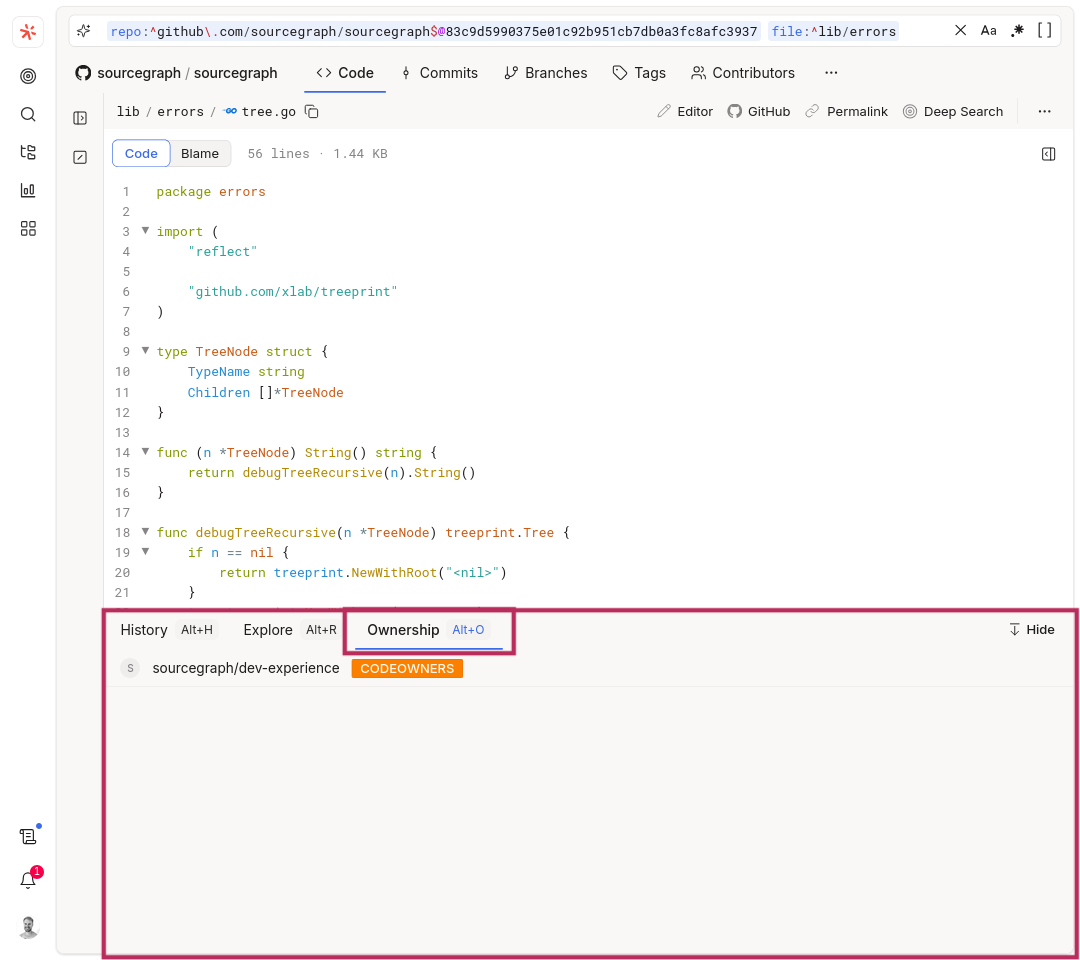 | ||
|
|
||
| ## Ownership search | ||
|
|
||
| ### Searching for files with owners | ||
|
|
||
| Code ownership is a first-class citizen in search. Ownership can be either a query input or a search result: | ||
|
|
||
| - `file:has.owner(user@example.com)` keeps only the search results associated with given user (here referred to by e-mail). | ||
| - `-file:has.owner(@username)` removes all results owned by specific user (here referred to by name). | ||
|
|
||
| Ownership predicate can also be used without parameters: | ||
|
|
||
| -`file:has.owner()` will only include files with an owner assigned to them. -`-file:has.owner()` will only include files without an owner. | ||
|
|
||
| When performing a search the `select:file.owners` predicate will return the owners for the result of that search. | ||
|
|
||
| For instance one can find all the owners of TypeScript files in a given repository by using `repo:^github\.com/sourcegraph/sourcegraph$ lang:TypeScript select:file.owners`. | ||
|
|
||
| ### Find commits in given release for given owner | ||
|
|
||
| To find all commits between versions `5.0` and `5.1` made by `sourcegraph/own` team, the following query could be used: | ||
|
|
||
| `repo:^github\.com/sourcegraph/sourcegraph$@5.1:^5.0 type:commit file:has.owner(sourcegraph/own)` | ||
|
|
||
| ## Further reading | ||
|
|
||
| In order to learn more please check out our references: | ||
|
|
||
| - [CODEOWNERS format](/code-ownership/codeowners-format) - Guide to using the CODEOWNERS file format to define ownership |
This file contains hidden or bidirectional Unicode text that may be interpreted or compiled differently than what appears below. To review, open the file in an editor that reveals hidden Unicode characters.
Learn more about bidirectional Unicode characters
Oops, something went wrong.
Add this suggestion to a batch that can be applied as a single commit.
This suggestion is invalid because no changes were made to the code.
Suggestions cannot be applied while the pull request is closed.
Suggestions cannot be applied while viewing a subset of changes.
Only one suggestion per line can be applied in a batch.
Add this suggestion to a batch that can be applied as a single commit.
Applying suggestions on deleted lines is not supported.
You must change the existing code in this line in order to create a valid suggestion.
Outdated suggestions cannot be applied.
This suggestion has been applied or marked resolved.
Suggestions cannot be applied from pending reviews.
Suggestions cannot be applied on multi-line comments.
Suggestions cannot be applied while the pull request is queued to merge.
Suggestion cannot be applied right now. Please check back later.
Uh oh!
There was an error while loading. Please reload this page.